
BESTBRAIN • WHATSAPP AGENTS
WhatsApp AI Agent Builder for Business
Help customers ask questions and share their requirements through WhatsApp. Build a focused conversation around your business knowledge, then connect the next step through a configured workflow.
Request a Demo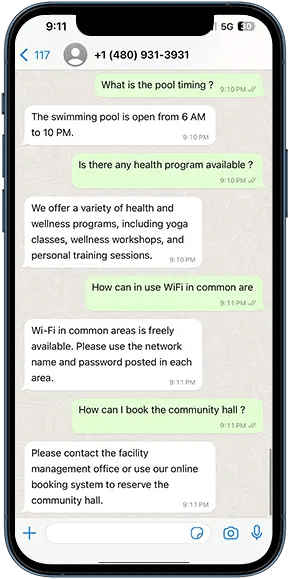
Build around your business process
Answer common enquiries
Prepare approved information about your products, services, and frequently asked questions.
Collect useful context
Ask relevant questions about a customer’s requirements so your team receives a more useful enquiry.
Connect follow-up actions
Design a workflow for recording details, notifying a team, or creating a support request in the appropriate application.
Define human handoff
Agree which questions need a person and how the conversation context reaches the responsible team.
Make every conversation useful
A customer asking about a service needs a clear answer and an easy next step. An AI agent can explain approved service information, collect the customer’s requirements, and prepare the context for a person to follow up.
Start with a narrow task such as answering opening questions or collecting enquiry details. Test the conversation with real examples before extending it to more complex actions.
Connect WhatsApp conversations to your business process
BestBrain workflows use n8n and Activepieces to connect application actions. Discuss your CRM, support platform, scheduling tools, and the fields each step needs. The team can confirm the connection route and setup for your deployment.
Explore workflow integrations and prepare a business knowledge base.
Plan your WhatsApp deployment
- Choose one customer journey and define the desired outcome.
- Confirm your WhatsApp Business setup, number, and connection method.
- Prepare the approved information and questions the agent should use.
- Agree the handoff, application actions, and handling of missing information.
- Review channel requirements, message templates where needed, and costs with the team.
- Test the complete journey and monitor the enquiries your team receives.
Frequently asked questions
Can the agent use our business documents?
BestBrain knowledge bases provide business information for agents. Prepare current, relevant source material and test the answers for your WhatsApp use case.
Can WhatsApp conversations create CRM records?
A configured workflow can connect conversation outcomes to application actions. Confirm the CRM, required fields, permissions, and duplicate handling during your demo.
What should we confirm before launching?
Confirm channel setup, account requirements, supported actions, handoff behavior, message requirements, and operating costs for your deployment.
See your use case in BestBrain
Bring your current process, business information, application stack, and expected volume. We’ll discuss a focused pilot and the outcome your team wants to measure.
Discuss Your Use Case