
BESTBRAIN • WORKFLOW AUTOMATION
AI Workflow Automation with n8n and Activepieces
Turn repeatable business tasks into connected workflows. BestBrain uses n8n and Activepieces to connect AI agents, business knowledge, and application actions in a process your team can understand.
Request a Demo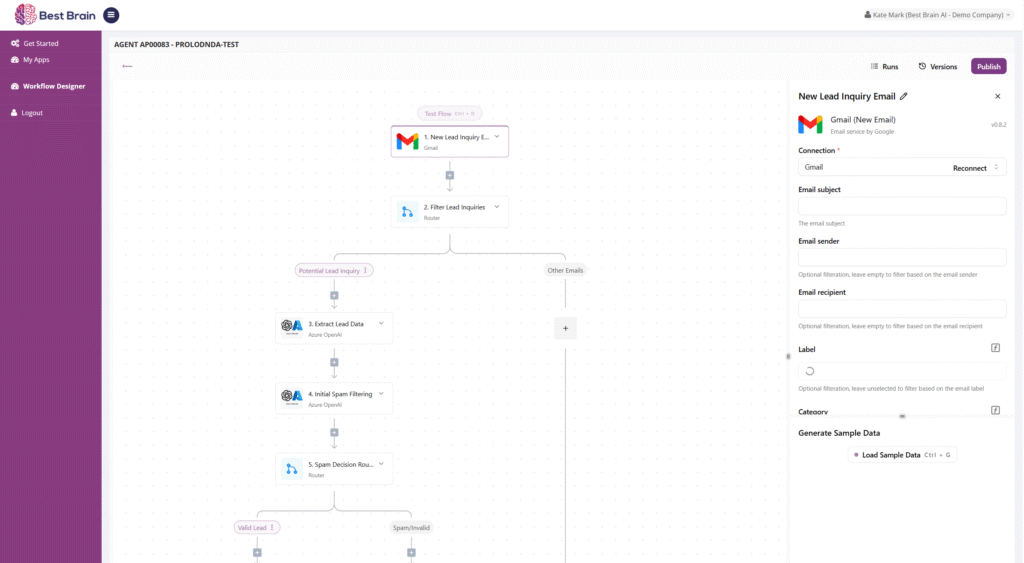
Build around your business process
Start with a trigger
Define what begins the process: a conversation outcome, an application event, a schedule, or a request.
Connect business applications
Use the n8n and Activepieces ecosystems to configure the application actions and data connections your workflow needs.
Add AI where it helps
Use an agent for tasks such as understanding a request or preparing an answer, with explicit workflow steps for business actions.
Plan the exceptions
Decide how the workflow handles missing fields, duplicate records, unavailable applications, and requests needing human review.
Example: turn an enquiry into a sales follow-up
A prospect asks a question through a chat agent. The agent answers from approved knowledge and collects relevant requirements. A workflow can then validate the details, create or update the prospect’s CRM record, and notify the right team.
The exact steps depend on your applications and permissions. In a pilot, confirm the trigger, field mapping, duplicate checks, error handling, and owner for every action.
A broad connector ecosystem, configured for your process
n8n and Activepieces publish directories of application connectors, triggers, and actions. These offer paths to CRM, support, scheduling, collaboration, and data tools. A directory listing is the starting point for a connection; the workflow still needs the right account access, supported actions, and testing.
See integration examples and the connection checklist. For an internal application, discuss its API or webhook requirements with BestBrain.
Build a practical first workflow
- Map one process and record its current time and failure points.
- Choose the trigger, application actions, and information each step needs.
- Set the agent’s instructions and knowledge boundaries.
- Test successful runs, incomplete inputs, and application errors.
- Measure completed outcomes and review exceptions before scaling.
Frequently asked questions
How are AI agents different from workflows?
An agent interprets a request and can use knowledge or tools to respond. A workflow coordinates defined steps and application actions. Many business processes benefit from both.
Which integrations are available?
BestBrain builds workflows with n8n and Activepieces. Share your application names and required actions so the team can confirm the connector, authentication, version, and setup for your deployment.
Where should we start?
Choose one frequent task with a clear owner and measurable result, such as enquiry routing or collecting information before a support handoff.
See your use case in BestBrain
Bring your current process, business information, application stack, and expected volume. We’ll discuss a focused pilot and the outcome your team wants to measure.
Discuss Your Use Case